


 Why do we ask?


† LifeLock does not monitor all transactions at all businesses.
Has your personal data been recently exposed?
Check if information like your Social Security number, email, and passwords is exposed on the dark web.


You have reached the maximum number of scans allowed. Please come back after 24 hours.

Scanning the dark web...
Scanning public databases...
Scanning millions of records...
Narrowing down the search...
We need more information
Please enter a few more details to ensure we show you the right information.
Risk level:
High
You’re at high risk
We found your personal information on the dark web and on data broker sites.
Your personalized protection plan
Product Benefits:
 Up to $3M Reimbursement for identity theft, with up to $1M for Stolen Funds†††
$10K Scam Reimbursement7
Scam Support
Credit, Checking and Savings Activity Alerts: Unlimited Accounts
Credit & Payday Loan Lock2
Credit Monitoring:
3 Bureau1
Automatic Data Broker Removal8
Dark Web Monitoring
Priority 24/7 Customer Phone Support
Up to $3M Reimbursement for identity theft, with up to $1M for Stolen Funds†††
$10K Scam Reimbursement7
Scam Support
Credit, Checking and Savings Activity Alerts: Unlimited Accounts
Credit & Payday Loan Lock2
Credit Monitoring:
3 Bureau1
Automatic Data Broker Removal8
Dark Web Monitoring
Priority 24/7 Customer Phone Support
LifeLock Total
Your price:
$
349.99
Your price:
$
34.99
60-day money back guarantee with an annual plan
24/7 Live Member Support
No one can prevent all cybercrime or prevent all identity theft.
- Price valid for introductory term. After that, your price will renew at the standard price.
- Your subscription begins immediately after your transaction is complete. A payment method is required at sign-up for trials, and you will be charged at the end of your trial, unless canceled first.
- Prices are subject to change and may be charged up to 35 days prior to renewal. Cancel here or contact Member Services.
- Restrictions apply. Automatically renewing subscription required. If you're a victim of identity theft and not satisfied with our resolution, you may receive a refund for the current term of your subscription. See lifelock.norton.com/guarantee for complete details.
††† Up to $1 million coverage for Lawyers and Experts included with all plans. Reimbursement and expense compensation vary according to plan. Insurance benefits are issued by third parties. See lifelock.norton.com/legal for policy info.
1 Bureau Monitoring and Monthly Credit Report and Score / 3 Bureau Monitoring and Monthly Credit Report and Score.
2 Credit Lock cannot prevent all account takeovers, unauthorized account openings, or credit file inquiries. Deactivates if you downgrade or cancel your subscription.
7 Scam protection coverage as part of identity theft benefits is currently available to all customers residing in the United States, including U.S. territories and the District of Columbia, with the exception of residents of New York. Gen Digital is not a licensed insurance producer. Benefits under the Master Policy are issued and covered by HSB Specialty Insurance Company. You can find further details and exclusions in the summary of benefits.
8 After setup, automatic data broker removal service scans and requests removal every 90 days.
Risk level:
Medium
You’re at medium risk
We found your personal information on data broker sites.
Your personalized protection plan
Product Benefits:
Up to $1.2M Reimbursement for identity theft, with up to $100K for Stolen Funds†††
$5K Scam Reimbursement7
Scam Support
Credit, Checking and Savings Activity Alerts:
5 Accounts
Credit & Payday Loan Lock2
Credit Monitoring:
3 Bureau1
Automatic Data Broker Removal8
Dark Web Monitoring
Priority 24/7 Customer Phone Support
LifeLock Advanced
Your price:
$
199.99
Your price:
$
19.99
60-day money back guarantee with an annual plan
24/7 Live Member Support
No one can prevent all cybercrime or prevent all identity theft.
- Price valid for introductory term. After that, your price will renew at the standard price.
- Your subscription begins immediately after your transaction is complete. A payment method is required at sign-up for trials, and you will be charged at the end of your trial, unless canceled first.
- Prices are subject to change and may be charged up to 35 days prior to renewal. Cancel here or contact Member Services.
- Restrictions apply. Automatically renewing subscription required. If you're a victim of identity theft and not satisfied with our resolution, you may receive a refund for the current term of your subscription. See lifelock.norton.com/guarantee for complete details.
††† Up to $1 million coverage for Lawyers and Experts included with all plans. Reimbursement and expense compensation vary according to plan. Insurance benefits are issued by third parties. See lifelock.norton.com/legal for policy info.
1 Bureau Monitoring and Monthly Credit Report and Score / 3 Bureau Monitoring and Monthly Credit Report and Score.
2 Credit Lock cannot prevent all account takeovers, unauthorized account openings, or credit file inquiries. Deactivates if you downgrade or cancel your subscription.
7 Scam protection coverage as part of identity theft benefits is currently available to all customers residing in the United States, including U.S. territories and the District of Columbia, with the exception of residents of New York. Gen Digital is not a licensed insurance producer. Benefits under the Master Policy are issued and covered by HSB Specialty Insurance Company. You can find further details and exclusions in the summary of benefits.
8 After setup, automatic data broker removal service scans and requests removal every 90 days.
Risk level:
Low
Good news!
We didn’t find your personal information across millions of records or on public data sources.
Your personalized protection plan
Product Benefits:
Up to $1.05M Reimbursement for identity theft, with up to $25K for Stolen Funds†††
Identity Restoration Specialists
Credit, Checking and Savings Activity Alerts:
2 Accounts
Credit & Payday Loan Lock2
Credit Monitoring:
2 Bureau1
Automatic Data Broker Removal8
Dark Web Monitoring
Breach Alerts
24/7 Customer Phone Support
Lifelock Core
Your price:
$
124.99
Your price:
$
12.49
60-day money back guarantee with an annual plan
24/7 Live Member Support
No one can prevent all cybercrime or prevent all identity theft.
- Price valid for introductory term. After that, your price will renew at the standard price.
- Your subscription begins immediately after your transaction is complete. A payment method is required at sign-up for trials, and you will be charged at the end of your trial, unless canceled first.
- Prices are subject to change and may be charged up to 35 days prior to renewal. Cancel here or contact Member Services.
- Restrictions apply. Automatically renewing subscription required. If you're a victim of identity theft and not satisfied with our resolution, you may receive a refund for the current term of your subscription. See lifelock.norton.com/guarantee for complete details.
††† Up to $1 million coverage for Lawyers and Experts included with all plans. Reimbursement and expense compensation vary according to plan. Insurance benefits are issued by third parties. See lifelock.norton.com/legal for policy info.
1 Credit features require successful setup, identity verification, and sufficient credit history by the appropriate credit bureau. Credit monitoring features may take several days to activate after enrollment.
2 Identity Lock cannot prevent all account takeovers, unauthorized account openings, or credit file inquiries. Deactivates if you downgrade or cancel your subscription.
8 After setup, automatic data broker removal service scans and requests removal every 90 days.
1/2
Finding your match...

DID YOU KNOW?
10 cents
If your information is exposed or stolen in a data breach, it can end up on the dark web where it can be sold for as little as 10 cents.
100M+
LifeLock monitors hundreds of millions of data points a second.
Based on your concerns, the best plan for you is:
LifeLock Core
(Individual)
LifeLock Advanced
(Individual)
LifeLock Total
(Individual)
LifeLock Core
(2 adults)
LifeLock Advanced
(2 adults)
LifeLock Total
(2 adults)
LifeLock Core
(2 adults + up to 10 kids)
LifeLock Advanced
(2 adults + up to 10 kids)
LifeLock Total
(2 adults + up to 10 kids)
Pricing details below*
Pricing details below*
Pricing details below*
Pricing details below*
Pricing details below*
Pricing details below*
Pricing details below*
Pricing details below*
Pricing details below*
- Up to $1.05M Reimbursement for identity theft, with up to $25K for Stolen Funds†††
- Up to $1.2M Reimbursement for identity theft, with up to $100K for Stolen Funds†††
- Up to $3M Reimbursement for identity theft, with up to $1M for Stolen Funds†††
- Up to $1.05M Reimbursement for identity theft, with up to $25K for Stolen Funds††† for each adult
- Up to $1.2M Reimbursement for identity theft, with up to $100K for Stolen Funds††† for each adult
- Up to $3M Reimbursement for identity theft, with up to $1M for Stolen Funds††† for each adult
- Up to $1.05M Reimbursement for identity theft, with up to $25K for Stolen Funds††† for each adult
- Up to $1.2M Reimbursement for identity theft, with up to $100K for Stolen Funds††† for each adult
- Up to $3M Reimbursement for identity theft, with up to $1M for Stolen Funds††† for each adult
- Credit Monitoring Coverage1
- Credit Monitoring1 each adult
- Credit Monitoring1 for family
- Credit, Checking & Savings Account Activity Alerts
- Credit, Checking and Savings Activity Alerts for each adult
- Credit, Checking and Savings Activity Alerts for family
- 401K & Investment Account Activity Alerts
- 401K/Investment Account Alerts for each adult
- 401K/Investment Account Alerts for family
- Recurring and Unusual Charge Alerts
- Unexpected & Suspicious Charge Alerts for each adult
- Unexpected & Suspicious Charge Alerts for family
- Stolen Funds Reimbursement†††
- Stolen Funds Reimbursement††† for each adult
- Stolen Funds Reimbursement††† for family
- Lawyers and Experts†††
- Lawyers & Experts††† for each adult
- Lawyers & Experts††† for family
- Automatic Data Broker Removal8
- Automatic Data Broker Removal8 for each adult
- Automatic Data Broker Removal8 for family
- Scam Reimbursement7
- Scam Reimbursement7 for each adult
- Scam Reimbursement7 for family
- Credit Reports & Scores1
- Credit Report & Score for each adult
- Credit Report & Score for family
- Social Media Monitoring
- Social Media Monitoring for each adult
- Social Media Monitoring for family

We have more plans to choose from.
See all plans

Have questions?
Contact sales
*Your subscription begins immediately after payment and automatically renews unless cancelled. Discount for annual plans are compared to monthly billing. Prices subject to change and may be charged up to 35 days before current term ends. Cancel here or contact Member Services.
††† Up to $1 million coverage for Lawyers and Experts included with all plans. Reimbursement and expense compensation vary according to plan. Insurance benefits are issued by third parties. See LifeLock.Norton.com/legal for policy info.
1 Credit features require successful setup, identity verification and sufficient credit history by the appropriate credit bureau. Credit monitoring features may take several days to activate after enrollment.
7 Scam protection coverage as part of identity theft benefits is currently available to all customers residing in the United States, including U.S. territories and the District of Columbia, with the exception of residents of New York. Gen Digital is not a licensed insurance producer. Benefits under the Master Policy are issued and covered by HSB Specialty Insurance Company. You can find further details and exclusions in the Summary of Benefits.
8 After setup, automatic data broker removal service scans and requests removal every 90 days.
Why do we ask?
Identifying your concerns gives us the ability to recommend the right plan for your needs.
Return to quiz
Why do we ask?
Knowing this number helps us recommend coverage that fits your needs.
Return to quiz
Why do we ask?
Providing your email address makes you eligible for notifications of potential identity threats.
Return to quiz
What are “Potential Spam” calls and how do you stop them?
Spam calls are always annoying, but they can also be dangerous. Scammers trying to steal your identity may get in touch by phone, and knowing how to spot them is your first line of defense. Use our tips to boost your protection against potential spam calls, and then get LifeLock to help reduce public exposure of your phone number, address, and other personal information.


Research from Truecaller found that spam and scam calls cost U.S. adults as much as $25 billion each year, with victims losing an average of $452 to scams. As if those numbers aren’t bad enough, the risk posed by spam and scam callers is only likely to worsen as new technologies and tactics make them more difficult to detect.
However, there are steps you can take to help reduce the chance of being targeted and minimize the damage if you are. Read on to learn more about the risks of potential spam calls and what you can do to minimize them.
What is “Potential Spam”?
“Potential Spam” is a label phone carriers use to notify customers that an incoming call is coming from an unverified, suspicious, or known spam or scam number. Cell phone carriers may label numbers — legitimate or otherwise — as potential spam after receiving multiple complaints about them or detecting suspicious activity, like the use of auto-dialers.
Different phone carriers use different versions of the phrase to label likely spam callers. US Cellular and Verizon use “Potential Spam,” AT&T uses “Spam Risk” or “Fraud Risk,” and T-Mobile uses “Scam Likely” or “Nuisance Likely.”
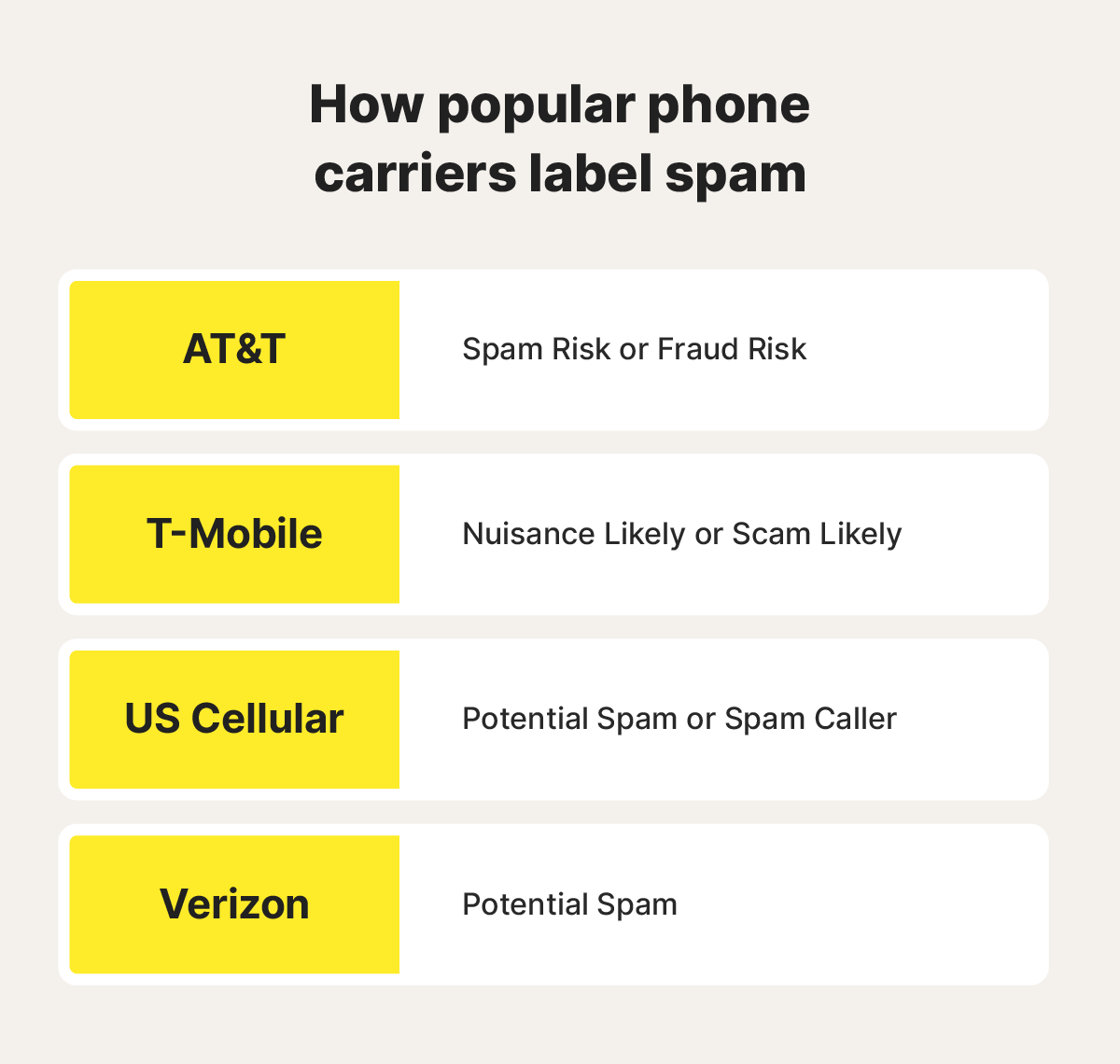
An image overviewing phone carrier “Potential Spam” warning labels.
Regardless of the wording, these warnings all mean the same thing: your carrier suspects that the call is coming from a spam number.
Why am I getting so many potential spam calls?
There are lots of ways for your phone number to fall into the wrong hands, all of which can lead to an increase in spam calls. Data brokers can find your number in public records or on social media, for example, and may sell it to scammers. Your phone number can also get exposed if a website you’ve signed up for suffers a data breach.
These are the main places your number might be found by spam or scam callers:
- Public records including “people search” websites and business directories.
- Personally owned websites you use to blog or promote your business.
- Public social media accounts on platforms like Facebook, X, or LinkedIn.
- Phishing links sent over text, email, or social media that lead to fraudulent websites.
- The dark web where stolen data, including phone numbers, is often sold by “data brokers” on dark web marketplaces.
- Data harvesting forms masquerading as surveys or contest entries.
- Data breaches where hackers steal people’s information, including phone numbers, from businesses.
If you’re getting inundated with spam calls, LifeLock can help. As a LifeLock member, you’ll benefit from dark web and people search site monitoring that sends automatic notifications† when your phone number is found online, so you can work on getting it removed. You’ll also benefit from a range of additional identity theft protection features that help boost your defenses against scammers.
What happens if I answer a potential spam call?
If you answer a potential fraud or spam call, you may inadvertently give the caller confirmation that the number is active which can lead to an increase in spam calls in the future. However, a spam caller won’t be able to take advantage of you if you realize your mistake and end the call before sharing sensitive information.
The real problems arise if you fall for the caller’s scheme and share personal information like your Social Security number (SSN), bank account information, or credit card details. Giving these details away puts you at risk of identity theft and financial fraud.
What to do if you answer a spam call
If you realize you’ve answered a spam or scam call, don’t provide any personal information and hang up immediately. Then, block the number and report it to both your cell carrier and the Federal Trade Commission (FTC).
If you shared personal information before realizing you were speaking with a scammer, you should immediately take steps to protect your identity and finances. Start by:
- Freezing your credit or placing a fraud alert
- Reporting the incident to your bank
- Reporting the scam to the FTC
- Monitoring your credit report for fraudulent or unauthorized activity
- Updating any compromised passwords or security questions
- Increasing online security measures including enabling two-factor authentication (2FA)
Should I block potential spam calls?
Yes, in most cases, blocking the numbers that are labeled as potential spam calls is an effective way to reduce unwanted interruptions and help protect yourself against falling for a scam.
You can also enable a spam filter, either using the built-in options on your phone or by downloading a trustworthy dedicated spam filter app. Just be aware that some spam filters may prevent legitimate calls from reaching you if they come from an unknown number.
How to stop spam calls
You can combat potential spam or fraud calls by enabling settings that filter calls from unknown numbers to voicemail, blocking spammers that slip through the cracks, registering with the National Do Not Call Registry, strengthening your defenses with a spam-blocking service, removing your phone number from the web, and reporting spam calls.
Filter calls from unknown numbers
Filtering calls from unknown numbers and sending them straight to voicemail can significantly cut down on the number of spam calls you have to manage. Here’s how to do it on iPhone and Android (steps for Android devices vary slightly depending on the brand and Android version).
How to filter unknown numbers on iPhone:
- Go to Settings, select Apps, and tap Phone.
- Choose Silence Unknown Callers.
- Toggle the switch to the right to send unknown numbers to voicemail.
How to filter unknown numbers on Android:
- Open the Phone app.
- Tap the three vertical dots at the top of your screen, then Settings.
- Toggle the switch next to Filter spam calls to avoid notifications from suspected spam calls.
Use a spam-blocking app or service
A third-party spam call-blocking app or service can bolster your built-in spam filter and help identify unwanted calls from telemarketers, scammers, and robocallers. These apps use number analysis, caller ID analysis, and user feedback to predict if inbound calls are legitimate. Some also offer features like custom block lists and call reporting to make spam management easier.

An image overviewing features to look for in a good spam-blocking app or service.
You can also use spam-blocking tools provided by your phone carrier. Here are a few you might find helpful:
- AT&T Active Armor is a call protection service that automatically identifies and blocks spam calls, sends unknown calls to voicemail, and allows you to create custom block lists.
- T-Mobile Scam Shield is a service that helps identify and block spam calls, tells you what type of spam a call is, and makes it easy to report spammers via the app.
- Verizon Call Filter is a service that helps block robocalls and spam and shows the caller ID for unknown numbers (even if they’re not saved in your contacts). It also provides spam risk ratings so you can decide whether or not to block a call.
Block spam callers
You can manually block individual spam callers that manage to sneak through your first lines of defense to stop annoying repeat phone calls.
Here’s how to block spam callers on iPhones:
- Open the Phone app.
- Tap Recents at the bottom of your screen.
- Find the spam number and tap the blue “i” to the right of it.
- Scroll down and choose Block this Caller.
Here’s how to block spam callers on Android:
- Open the Phone app.
- Find Recents at the bottom of your screen.
- Select the number you want to block.
- Choose the Info icon next to or under the number.
- Tap Block and confirm your choice.
Register with the National Do Not Call Registry
Adding your phone number to the National Do Not Call Registry should keep law-abiding telemarketing companies from contacting you. Once you’ve registered, it’s illegal for companies to call you without your express consent. However, this step might not keep illegal scammers from trying to contact you.
Remove your number from the web
Proactively removing your phone number from social media and public people search sites can reduce your vulnerability to spam callers. However, if a hacker steals your contact details or other data and shares them on the dark web, there’s no easy way to remove it. In this situation, protect your digital identity by renewing security across accounts that may be compromised.
Report spam calls
Finally, you can report spam calls to the FTC and Google (if you’re an Android user) so they can flag future calls from the number as potential spam.
To report a spam call:
- To the FTC: Visit the FTC website and follow the on-screen instructions. During this process, you’ll have a chance to share details about the call, including the phone number that was used.
- On Android: Go to the recent calls log, select the spam number, and hold the number until you see the option to Report spam.
Help protect against spam calls
LifeLock includes privacy monitoring and dark web monitoring features that scan hundreds of millions of data points per second, helping you find your phone number and other personal information in places it’s not supposed to be so you can take steps to remove it and shore up the security of your personal information.
As a LifeLock member, you’ll also qualify for support from a U.S.-based identity restoration specialist and reimbursement for up to $25,000 of funds stolen through identity theft, helping you recover if you ever fall for a scam on the phone.
Editors’ note: Our articles provide educational information about identity theft, scams, financial fraud, and other topics that can put your identity or personal accounts at risk. LifeLock offerings may not cover or protect against every type of crime, fraud, scam, or threat we write about. For more details about how we write, review, and update our articles, see our Editorial Policy.
Related articles

Internet Security
Social Media Identity Theft: How to Protect Yourself
October 22, 2020
·
3 min read

Internet Security
Are digital wallets safe? Here’s what you can do to make them safer
September 06, 2022
·
3 min read


Scams & Fraud
How to navigate car warranty calls without getting scammed
December 19, 2025
·
9 min read


Internet Security
Social Media Identity Theft: How to Protect Yourself
October 22, 2020
·
3 min read
Internet Security
Are digital wallets safe? Here’s what you can do to make them safer
September 06, 2022
·
3 min read
Scams & Fraud
How to navigate car warranty calls without getting scammed
December 19, 2025
·
9 min read
Internet Security
Social Media Identity Theft: How to Protect Yourself
October 22, 2020
·
3 min read
Internet Security
Are digital wallets safe? Here’s what you can do to make them safer
September 06, 2022
·
3 min read